Tips for submitting tracks to independent radio
Context
I have been presenting and programming a radio show called Fractal Meat on a Spongy Bone since 2012. For the first few years this was presented live in the NTS studio, and often had guests to chat and play tracks, and live performances.
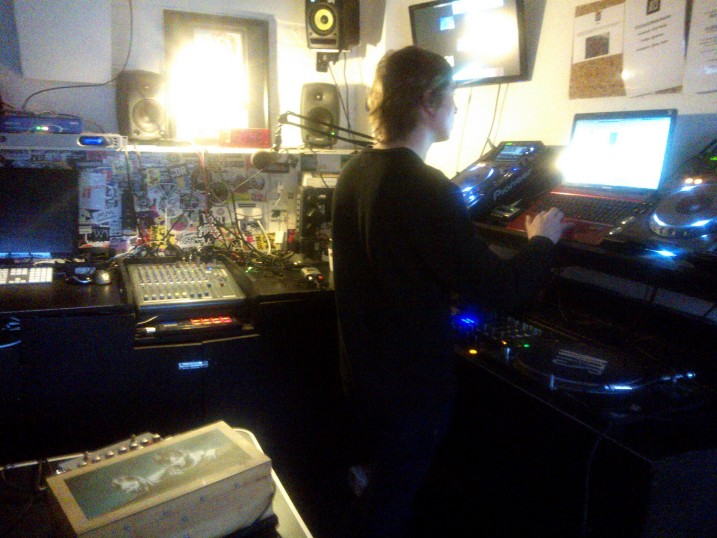
Nowadays the show broadcasts overnight so I prepare it in advance. Each episode is a two-hour continuous mix of sound and music, with no introductions or talking from me. Occasionally I might include guest mixes by other artists. NTS, the statio which hosts the show, is an independent internet radio station started in London with off-site stations across the globe. NTS don’t give me any direction or interfere in any way in the programming of my show – I can play whatever I want.
The show page is on the NTS site, here: https://www.nts.live/shows/fractalmeat. Each archived show is available at the bottom of the page, with tracklistings.
The kinds of thing I play on the show include: experimental music, improvisation, field recordings, noise, drone, computer music, live coding, free jazz, abstract electronics, leftfield techno, contemporary classical, dark ambient, sound installation documentation, live sets, video work soundtracks. I typically try and play a lot of newly released material, but also older stuff including foundational experimental works and archival material.
Below are my tips for submitting tracks to radio shows like mine for consideration for airplay. Please note that these are very much tailored to my own preferences. I’m sure other shows do things differently but these are some things that I find helpful programming my show. If you want to send me something, you can email me at fractalmeat (at) gmail com.
Make it easy
Shows get loads of submissions and it can take a long time to go through them. I personally source most of the tracks from my own discoveries, and don’t rely much on promos, so if it’s a hassle to read or I need to ask the sender for a file or different format, it can end up taking too long to bother with. As such, the easier you can make the process for the person reading your email, the better. Most of these tips relate to this in some way.
Show remit
Check out the show before submitting, if you have time. Some shows are very specific in what they play, others less so. It’s a waste of everyone’s time emailing shows that only play a completely different genre to what you make. Try and make it relevant if you can. That said, you have to balance your time too. I personally release music in different genres and I don’t have different press mailing lists for different releases. I’m sure they often end up getting deleted quickly, but for me it’s not worth the time to send individual emails.
Clear information
It’s worth being clear about the basics. Artist name, release title, format, release date. This applies more to press coverage – magazines tend to want to review upcoming releases, for example – but can be relevant to radio too. Being clear about who the artist is is most important.
keep it concise
You don’t need to send pages and pages of context, biography and press release information – it probably won’t be read anyway (I personally don’t). Keep the information concise and to the point. A couple of lines about the artist and a couple of lines about the particular release is perfect.
key words
It can be really helpful to include a few key words, to help the reader quickly check whether your work is likely to be relevant. I do this myself when submitting tracks to other shows.
As an example, for my last release I used the following keywords: improvisation, electronics, turntable, process music, noise, drone.
Links for more info
Do include a link to your website for more information, if you have one. Even if it’s just a landing page with your contact info. It’s good to have some sort of online presence outside of social media. It seems like lots of people only use instagram to share their work and contact infonowadays, but as someone who’s no longer on the platform that’s redundant to me. Your work is behind a paywall to anyone who isn’t signed up.
Include your email address so shows can tell you if they have played your work. Not all of them/us do (I try and do it now, but it’s an extra admin task I don’t always get time for), but it’s important to be easy to reach if you do want that feedback.
Files
For me, it’s really important that artists send a track/file I can download. A streaming link is useless for putting into a radio show.
Some people don’t want to waste download codes or risk their files being shared before release date, which is understandable. I think the expectation is that the radio host would listen to the streams, then request the file they want to play. For me, this is too time consuming, and the extra step breaks my flow. I tend to download files, preview tracks, and put the show together all in one day’s work – If i need to wait for an email reply in that process, it isn’t going to work.
File locations
It’s better not to attach the file to the email itself, rather to include download links in the email.
Dropbox, googledrive etc work fine. I would avoid free WeTransfer links, due to the one-week expiry. As my show is monthly, I collect promo emails across the month and download them all in the week of the show – sometimes by that time I’ve missed a Wetransfer download.
If you’re uploading a folder (eg, all the tracks in an album) it’s important to name the folder properly. Calling it “mp3” or “wav” is confusing, as I’m normally downloading several files in a session. I’d suggest “Artist Name – Album Title (mp3)”
format/s
My preference is for MP3. Some people/shows want WAVs as they need uncompressed files. I would suggest linking to a folder of each, in most cases.
File names and tagging
As above, most show hosts will be downloading dozens of files to sort through for the show. If your file isn’t properly titled it can easily get lost in the folder – even if it gets played, they won’t be able to credit you. Again, I’d suggest “Artist Name – Track Title” for each file. Even if they’re in a folder which is fully labelled, they can get split up and lost.
Equally important is MP3 tagging. The metadata in the file can help if the filename info isn’t there. I highly recommend the free program MP3tag for this. Get it at https://www.mp3tag.de/en/
I’m often surprised by how bad promo companies and distributors are at organising files and tagging mp3s. It seems like such a basic thing to do – to make sure that the person listening knows what they’re listening to – but many don’t do it.
download codes
An alternative to sharing links to files is to send a bandcamp download code. There a few good reasons to do this. First, the recipient can choose whatever file format they want, and bandcamp does it automatically. The downloaded files will have the artist name and track title in each one, and the mp3s will be tagged properly too.
If the show or presenter has a bandcamp fan account, they have the option to add your release to their collection. This can make it visible to other people who follow them, and your release might find new ears. I’d say over half of the music on my collection page is either stuff I’ve bought for the radio show or promos people have sent me: https://bandcamp.com/grahamdunning. If someone redeems a download code, they show up on the release page as someone who supports the album. Sharing a bunch of codes makes your release page look like people are interested in it – whether this leads to more sales or not is debatable, but it’s worth bearing in mind.
track length
My show is two hours long. Many shows are only an hour. If your album is a single continuous piece 54 minutes long, it’s unlikely someone will play the whole thing. Consider including a couple of radio edits with your promo – probably around five minutes each. This way, you get to choose what you think are the best bits, rather than the show host choosing a bit. Track length is often a deciding factor for me in choosing which piece from a certain album I play. I’m looking for a track which can say what it needs to say in five minutes or so. I do often play shorter and significantly longer pieces, but the average track length on the show is probably five minutes.
Discogs
One last bonus tip specific to NTS. As show hosts we are required to upload playlists for every episode, which are formatted only as “artist name – track title”. These are included on the episode page [example]. By an automatic process, links to discogs for the appropriate release are added. Anyone can add any release to discogs. So if you have put your digital release out already, add it to discogs before sharing your promo – it should get linked on the show page if someone on NTS plays your stuff.

